V-2000 New Method Update
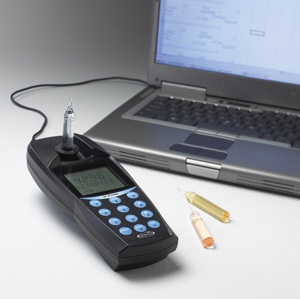
The CHEMetrics V-2000 Photometer contains internal calibration software for use with instrumental test kits in the CHEMetrics range. As existing calibrations are updated or new instrumental test kits become available, a new Method Revision is released by CHEMetrics and is posted on this page. A simple upload procedure allows analysts to automatically upgrade their V-2000 from their PC to the latest version.Galgo are also offering a free upgrade service, performing this update for you and returning your unit within 3-5 working days after receipt. All newly purchased V-2000s come as standard with the latest Method Revision.
The V-2000's method revision number is displayed briefly on power up. The current method revision number is 20.0.

Updating the method revision will not overwrite any user-generated custom methods you may have created nor remove any discontinued programs. New V-2000s supplied with Method Revision 20.0 will not include the discontinued calibration programs.
What's New In Method Revision 20.0?
The latest V-2000 Method Revision is 20.0, released on 9 September 2022, and impacts the following test kit calibrations.
| Analyte | Test Kit | Range (ppm) | Program Code | Calibration Change |
|---|---|---|---|---|
| Ammonia | K-1513 | 0 - 10.0 (as N) | 17 | Program Added (New Product) |
| Ammonia | K-1513 | 0 - 150 (as N) | 18 | Program Added (New Product) |
| Hydrazine | K-5003 | 0 - 1.20 | 89 | Program Removed (Discontinued Product) |
| Hydrogen Peroxide | K-5513 | 0 - 3.00 | 93 | Program Removed (Discontinued Product) |
| Iron | K-6003 | 0 - 6.00 | 100 | Calibration Update |
| Iron | K-6023 | 0 - 2.50 | 102 | Calibration Update |
| Iron | K-6203 | 0 - 6.00 | 103 | Calibration Update & New Program Code Added |
| Monochloramine | K-6803 | 0 - 8.00 | 117 | Program Added (New Product) |
| Nitrite | K-7013 | 0 - 0.750 (as N) | 130 | Program Added (New Product) |
| Ozone | K-7423 | 0 - 5.00 | 133 | Calibration Update |
| Oxygen (Dissolved) | K-7503 | 0 - 2.00 | 140 | Program Removed (Discontinued Product) |
| Phosphate | K-8513 | 0 - 8.00 (as PO4) | 159 | Calibration Update |
| Phosphate | K-8513 | 0 - 2.64 (as P) | 160 | Calibration Update |
| Sulphate | K-9203 | 0 - 100.0 | 174 | Calibration Update - for kits inc. A-9202 with lot nos. > 96000 |
Hardware Requirements
- PC with Windows XP, Vista, 7, or 10 with administrator rights.
- RS-232 interface cable supplied with the V-2000, including serial adapter.
- Optional A-0307 USB cable adapter for computers without an RS-232 or serial port.

The A-0307 adapter (pictured left) includes a driver installation CD which will allow your USB port to recognise the cable - install this prior to beginning the V-3000 upgrade procedure. Whichever port you are using to plug the V-2000 cable into, we suggest you check which COM Port it is assigned under Control Panel. Hardware requirements and connectivity is discussed in Chapter 5 (p.12-14) of the V-2000 Operator's Manual.
Method Update Procedure
The method update procedure is described in Section 5-3 (p.14) of the V-2000 Operator’s Manual, below.
Downloads

|
V-2000 Method Revision 20.0 Update File |

|
V-2000 Operator's Manual (05/2024 Rev. 33) |
Method Update History
Historical Method Revisions releases and their associated calibration/program updates, are listed in the table below. This shows the calibration enhancements and/or additions between versions.
| Method | Date | Changes |
|---|---|---|
| 19.0 | 03/09/2019 | Calibrations Updated: 93 (Hydrogen Peroxide), 115 (Molybdate), 179 (Sulphide), 180 (Sulphide) Programs Removed: 9 (Aluminium) |
| 18.0 | 25/06/2018 | Calibrations Updated: 26 (Chloride), 89 (Hydrazine), 95 (Hydrogen Peroxide), 142 (Oxygen), 148 (Peracetic Acid), 153 (Phenols) Programs Removed: 78 (Formaldehyde), 83 (Glycol), 84 (Glycol), 101 (Iron) |
| 17.0 | 12/05/2017 | Calibrations Updated: 9 (Aluminium), 16 (Ammonia), 55 (Copper), 140 (Oxygen), 141 (Oxygen), 142 (Oxygen), 152 (Phenols), 158 (Phosphate), 168 (Silica), 179 (Sulphide) Programs Added: 12 (Ammonia), 13 (Ammonia) |
| 16.0 | 21/12/2015 | Calibrations Updated: 48 (COD LR), 119 (Nitrate), 120 (Nitrate), 121 (Nitrate), 122 (Nitrate), 125 (Nitrite), 187 (Zinc), 188 (Zinc) |
| 15.0 | 20/02/2015 | Calibrations Updated: 22 (Bromine), 32 (Chlorine), 37 (Chlorine Dioxide), 84 (Glycol), 93 (Hydrogen Peroxide), 119 (Nitrate), 120 (Nitrate), 121 (Nitrate), 122 (Nitrate), 125 (Nitrite), 133 (Ozone), 148 (Peracetic Acid), 188 (Zinc) |
| 14.0 | 30/09/2013 | Calibration updated: 174 (Sulphate) Program Removed: 134 (Ozone) |
| 13.0 | 19/12/2011 | Programs Added: 22 (Bromine), 24 (Carbohydrazide), 133 (Ozone), 93 (Peroxide), 161 (Total Phosphate) Programs Removed: 21 (Bromine), 94 (Hydrogen Peroxide) |
| 12.0 | 22/06/2011 | Calibrations Updated: 60 (Cyanide), 78 (Formaldehyde), 83 (Glycol) Program Added: 148 (Peracetic Acid) Program Removed: 147 (Peracetic Acid) |
| 11.0 | 19/04/2010 | Calibrations Updated: 15 (Ammonia), 16 (Ammonia 2) |
| 10.0 | 12/01/2009 | Calibrations Updated: 119 (Nitrate), 120 (Nitrate 2), 121 (Nitrate 3), 122 (Nitrate 4) 152 (Phenols), 153 (Phenols 2), 158 (Phosphate 1), 187 (Zinc), 188 (Zinc 2) |
| 9.0 | 08/10/2008 | Calibrations Updated: 73 (Fluoride), 125 (Nitrite), 142 (Oxygen 3) Program Added: 160 (Phosphate 2) |
| 8.0 | 24/03/2008 | Calibrations Updated: 89 (Hydrazine), 140 (Oxygen 1), 141 (Oxygen 2), 159 (Phosphate 2), 174 (Sulphate) |
| 7.0 | 10/03/2006 | Program Added: 122 (Nitrate 4) |
| 6.0 | 22/05/2005 | Calibration updated: 64 (DEHA 1) |
| 5.0 | 12/11/2004 | Calibration updated: 49 (HR COD) |
| 4.0 | 24/02/2004 | Calibration updated: 49 (HR COD) |
| 3.0 | 29/01/2004 | Original Version |